Guides / October 27, 2026
What Must a DFARS Cyber Incident Report to the DoD Include?
A cyber incident starts a 72 hour clock the moment you discover it. That clock leaves no time to hunt for forms, contacts, and facts. Build the report shell now, so an incident only fills in the blanks.
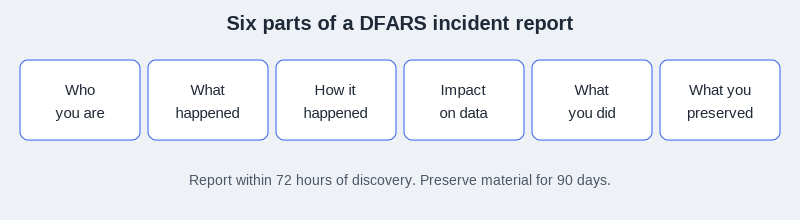
DFARS means Defense Federal Acquisition Regulation Supplement. DoD means Department of Defense. CDI means Covered Defense Information. DFARS clause 252.204-7012 requires contractors to report a cyber incident within 72 hours of discovery. DIBNet is the Defense Department portal for these reports.
What counts as a reportable incident
A reportable incident affects CDI on a covered system. It can also affect your ability to provide operationally critical support. When in doubt, treat the event as reportable and start the clock. Waiting to confirm the full scope is how contractors miss the deadline.
The clause asks for as much information as you can obtain within 72 hours. A partial report on time beats a full report late. You can update the report as the investigation learns more.
The six parts of the report
First, who you are. Give your company name and point of contact. Give the contracts affected or possibly affected. Give the contracting officer contact for each contract.
Second, what happened. Give the date you discovered the incident. Give the locations of compromise. Give the type of compromise, such as unauthorized access or unauthorized release. Give the outcome, such as a successful compromise, a failed attempt, or unknown.
Third, how it happened. Describe the technique or method used, as far as you know it. Write a plain narrative of events in order. Name the systems involved and the programs they support.
Fourth, the impact on CDI. Say what CDI was on the affected systems. Say whether CDI was released, and whether that is still unknown. Say whether your ability to provide operationally critical support was affected.
Fifth, what you did. List the steps taken to contain the incident. List the steps planned next. Name any malicious software found, and be ready to submit it if DoD asks for it.
Sixth, what you preserved. Preserve images of all known affected systems. Preserve relevant monitoring and packet capture data. Keep that material for at least 90 days from the report date. DoD may ask for it, or decline interest, within that window.
Three things to set up before an incident
First, get the reporting credential early. DIBNet access needs a Defense Department approved certificate. Apply for it now, not during an incident. Test that someone on your team can log in.
Second, name the report writer in advance. One person owns the draft. One backup owns it when the first person is away. Both need access to the contract list and the system list.
Third, rehearse the first hour. Run a tabletop exercise with a fake incident. Time how long it takes to fill each of the six parts. Fix every blank that took more than an hour to fill.
Sources
- DFARS 252.204-7012.
- NIST SP 800-171 Revision 2.
- Original diagram by PolicyCortex.
Next step
Want evidence tied to each requirement from live systems? See how PolicyCortex collects it.